


My Porsche
3.9200.00 Reviews
App Specs
- Version
- 20.26.34-pcna+184861
- Updated On
- License
- Free
- Downloads
- 50,000+
- Developer
- Porsche Cars North America, Inc.
- Categories
- Auto & Vehicles
- Platform
- Android
Screenshots
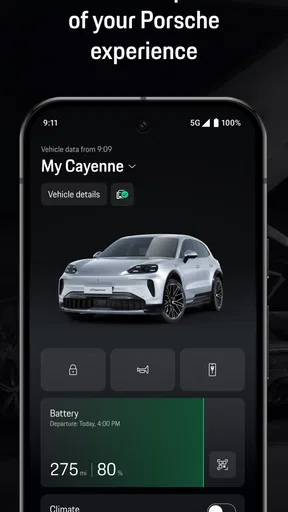
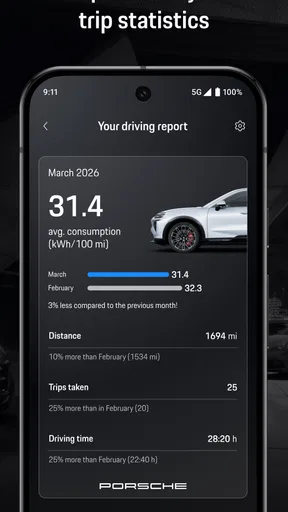
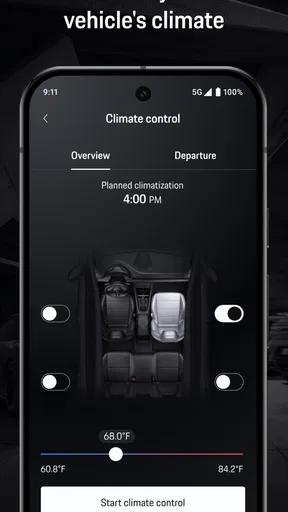
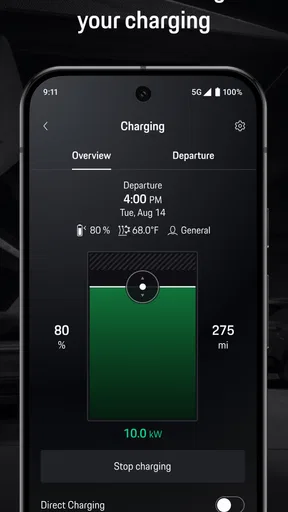
 Analysis by AppCompare
If you own a Porsche, My Porsche is designed to put the relationship with the car in one digital place rather than leaving you to juggle a manufacturer app, a browser, and dealership conversations. I approached it less like a flashy driving companion and more like an ownership tool: useful when I need vehicle-related information or account access, but only as valuable as the connected services and Porsche details attached to my account.
The app sits in the Auto & Vehicles category and is developed by Porsche Cars North America, Inc. It is free, available to everyone by age rating, and supports Android devices running version 10 or later. Its current version is 20.26.34-pcna+184861. The public reception is reasonably positive rather than overwhelming, with a 3.9 average from around 981 ratings and more than 50 thousand installs.
What My Porsche is really useful for
The short store description calls it “My Porsche,” while the broader summary presents it as a digital companion. In practice, I think of that companion idea as an account-centered doorway into Porsche ownership. It is not the same thing as a general navigation app, a universal car tracker, or a replacement for a service department. Its value depends on whether you have a Porsche relationship that the app can recognize and whether the information you need is available through your account.
That distinction matters before downloading it. Someone researching cars, borrowing a Porsche occasionally, or simply wanting a generic driving dashboard may find the app too specialized. An owner, lessee, or customer already connected to Porsche services has a clearer reason to try it. The app makes the most sense when you want to check your own ownership information, keep Porsche-related tasks together, and reduce the need to search through unrelated phone apps.
I also appreciate that the app is free. That removes one common barrier to testing it, although “free” should not be confused with every Porsche service being included in the app. The application is a digital access point, not a promise that every vehicle function, dealership action, or connected feature is available to every account.
Trust starts with the account, not the badge
A Porsche logo can create an immediate sense of confidence, but I would not use branding alone as a privacy or reliability guarantee. The more useful question is what the app lets me see and control once I sign in. With a vehicle-related application, the account is important because it may connect personal identity with ownership information, vehicle details, service interactions, or other information chosen by the user.
My advice is to treat the first setup as an account review rather than a five-second installation. Read each screen, check which vehicle or Porsche relationship is selected, and avoid accepting a connection simply because it makes setup faster. If the app offers choices about notifications, linked vehicles, or communication preferences, I would make those decisions deliberately. Clear choices are more valuable than a long list of features that I never understand.
Worth Reading Before You Choose

EA SPORTS FC Mobile 26 Is a Bigger Football Game, but It Takes Time

Flipboard Shows What News Apps Must Do Beyond the Feed

Switching to Android Auto Means Rethinking Your Driving Routine

Google Calendar Makes a Crowded Week Easier to Manage

Ludo King Makes the Most of the Minutes Between Plans

Baby Panda World Brings Quick Play to Modern Phones, but Its Game Library Feels Busy
The app’s rating suggests a mixed real-world experience. A 3.9 average is not a warning by itself, but it does tell me not to assume that every owner will find the experience equally smooth. Account matching, regional availability, vehicle eligibility, and the quality of the information shown can all affect whether a connected automotive app feels dependable. I would judge it after checking my own account, not from the brand name or download page alone.
What to check during setup
I would begin by confirming that the app is installed on a compatible device and that the login belongs to the Porsche account I actually intend to use. If several people in a household interact with the same vehicle, I would be especially careful about which account is primary and which information should be shared. A shared phone or a borrowed device is not the right place to leave an account signed in casually.
Next, I would review notifications one group at a time. Notifications can be convenient for reminders and updates, but they can also expose vehicle-related information on a locked screen. I prefer notifications that tell me something needs attention without displaying unnecessary details where another person can read them. If the app provides separate controls, I would keep only the categories that solve a real problem.
Finally, I would look through the account and vehicle screens before relying on them. A practical test is to identify information I already know, such as the vehicle associated with my account, and compare what the app displays. This is a small but useful trust check: it confirms that I am looking at the correct profile before I use the app for decisions involving service, travel, or vehicle access.
Controls, privacy choices, and everyday ownership
I’d treat the first setup as a quick account check, not just a login: confirm the vehicle and profile are right, then choose only the notifications and permissions that make ownership easier for you. That small pause helps keep convenience on your terms. It also gives me a useful way to judge whether the app fits my everyday routine before I rely on it for Porsche-related tasks.
Use the app as a controlled information window
My Porsche is most convincing when I use it as a deliberate window into Porsche-related information rather than leaving it open as a background habit. I do not need to open a vehicle app constantly. I need it at particular moments: before a service appointment, when checking an ownership detail, when reviewing a message or update, or when I am away from the car and want to see what my account provides.
That workflow has a privacy advantage. Opening the app only when needed limits how often I expose account information on screen and makes it easier to notice whether the displayed vehicle and profile are correct. I would also avoid signing in on a public or borrowed phone. If I have to use another device, I would sign out afterward and check that the account is no longer available through saved credentials.
One non-obvious benefit of this approach is that it separates convenience from automatic trust. I can still enjoy a central Porsche experience without treating every prompt as mandatory. When a screen asks me to enable a setting, connect a service, or share information, I can pause and ask whether that option improves something I actually do. That is a healthier habit than enabling everything and trying to undo it later.
A realistic day with the app
Imagine that I have a service visit coming up and want to prepare while away from the car. I would open the app, confirm that the correct Porsche and account are selected, review the information available for that vehicle, and note anything I need to discuss with the service team. I would then close the app rather than leaving it open in the background. At the appointment, the app becomes a reference point, but I would still verify important details directly with the dealer or technician.
That last step is important. An app can organize information, but it should not replace a human confirmation when the matter involves safety, repair approval, billing, or a time-sensitive decision. If the app shows something that conflicts with paperwork or what the service department says, I would treat the discrepancy as a reason to ask questions, not as proof that one side is automatically correct.
Another useful scenario is household ownership. If two people use the same Porsche, the app may be convenient for the person who manages the account, but the arrangement should be discussed openly. I would not assume that installing the app on a second phone creates the right access automatically. Each person should understand what they can see, which notifications they receive, and whether their account is personal or shared.
Where data sensitivity becomes practical
Vehicle apps can feel harmless because they are associated with a car, yet the surrounding account may still be personal. Login details, vehicle identity, contact information, service history, or messages can become sensitive when combined. I therefore pay attention to where I use the app, what appears in notifications, and who has access to the phone itself.
I would be cautious on a work phone, a family tablet, or any device protected by a weak passcode. I would also avoid taking screenshots of account pages unless there is a clear reason, since screenshots can remain in cloud photo backups or messaging histories long after the original task is finished. This is not a criticism unique to Porsche; it is simply the sensible way to handle a vehicle account.
Location is another moment that deserves attention in any connected-car experience. I would not grant a location-related permission automatically just because the app requests it. I would first consider whether the function I want genuinely needs location, then choose the narrowest option offered by the operating system. If a feature works without continuous access, I would prefer that arrangement. If it does not, I would decide whether the convenience is worth the added exposure.
Because the app is for Porsche ownership rather than general motoring, I would also be careful when transferring or selling a vehicle. Before handing over a car, I would review the account, remove the vehicle if the app provides that control, and sign out of devices that no longer belong to me. I would confirm the handover with Porsche or the relevant dealer when necessary. Leaving an old vehicle attached to a personal account is an avoidable source of confusion.
What the app does better than usual alternatives
The usual alternative is a mixture of phone contacts, web pages, email, paper documents, and a general notes app. That approach can work, but it scatters information. My Porsche has a clear advantage when the task is specifically tied to a Porsche account or vehicle because I do not have to remember which generic tool contains which detail.
A browser can be more flexible for reading long documents or managing an account on a large screen. A dealership phone call is better when I need an explanation, a repair decision, or a human answer. A general navigation app is better for route planning. The Porsche app should not replace those tools; it earns its place by gathering the Porsche side of ownership in a more focused space.
The trade-off is specialization. A general app often works across vehicles, drivers, and services. My Porsche is more relevant when my needs are Porsche-specific, but less useful if I want one dashboard for a mixed household fleet. If I drive several brands, I would not expect this app to become my universal car organizer. I would use it alongside, not instead of, broader tools.
Small habits that make the experience safer
- Check the selected vehicle before acting: if your account includes more than one Porsche relationship, verify the active vehicle before reading or changing anything.
- Keep notification text restrained: use the phone’s notification controls to prevent account or vehicle details appearing openly on the lock screen.
- Review access after ownership changes: when a vehicle is sold, returned, or transferred, clean up the app account instead of assuming the connection will disappear by itself.
- Use direct confirmation for important decisions: treat the app as a convenient reference, while confirming safety, repair, payment, and legal matters with Porsche or the responsible professional.
These habits are more valuable than simply installing the latest release and forgetting about it. The current version may improve the experience, but version updates do not remove the need to review account choices. I would keep automatic updates enabled for security and compatibility, then revisit permissions and notifications after a major change in how I use the app.
Who should use it, and who should skip it?
I would recommend trying My Porsche to a Porsche owner or customer who wants a dedicated digital connection to the brand and prefers having vehicle-related account information in one place. It is also sensible for someone who frequently deals with Porsche service or ownership tasks from a phone and wants a more focused alternative to searching through email and browser bookmarks.
I would be less enthusiastic for a person who does not have a Porsche account or vehicle relationship to connect. The app is unlikely to become useful merely because someone likes the brand. I would also suggest skipping it if you want a universal car-management app, a complete navigation solution, or a tool that replaces conversations with technicians and dealers.
Privacy-conscious users should not automatically avoid it, but they should set it up carefully. The right question is not whether the app is branded by a major car company; it is whether the account controls, notifications, and permissions fit the way you want to manage your information. If the available choices feel too broad for your comfort, the app may not be worth the convenience.
My final view after weighing convenience against control
My Porsche is a sensible companion for the right owner, but I would not call it essential for everyone. Its strongest quality is focus: it is built around the Porsche relationship instead of trying to be a generic automotive toolbox. That focus can make everyday ownership feel more organized, especially when I want to check account-linked information without moving between unrelated services.
Its limits are equally clear. The usefulness depends on the account and vehicle context, and a free app does not guarantee that every connected service or ownership task will appear in the same way for every user. I also would not rely on it alone for important service, safety, or financial decisions. A digital screen is convenient, but it is not a substitute for accurate documentation or a qualified Porsche representative.
My cautious verdict is positive: use it as a focused Porsche account companion, not as an all-purpose car control center. Install it if you own or manage a compatible Porsche relationship, then spend a few minutes checking the active vehicle, notification exposure, permissions, and account access. If those controls match your expectations, the app can earn a regular place on your phone. If you only want general driving tools or prefer not to connect vehicle information to a manufacturer account, a browser, dealership contact, and independent automotive apps may serve you better.
Pros
- Remote vehicle controls let you lock
- unlock
- and check your Porsche remotely.
- Service reminders and dealer contact tools simplify maintenance planning.
- Live vehicle status can show fuel or battery level before a trip.
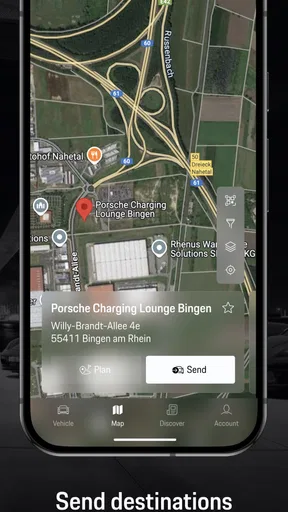
- Trip and destination features help prepare routes before entering the car.
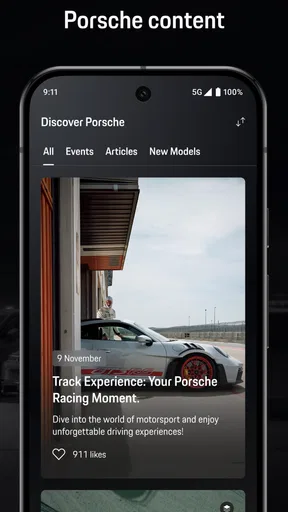
- Porsche-specific content and support are conveniently gathered in one app.
Cons
- Many remote features require a compatible Porsche model and connected services.
- Vehicle data may take time to refresh
- especially with weak mobile coverage.
- Some functions depend on an active Porsche Connect subscription.
- The app offers limited value if you do not own or regularly drive a Porsche.
- Battery and location services may increase background power and data usage.
FAQs for My Porsche
What is the My Porsche app used for?
My Porsche is the official companion app for Porsche owners and drivers. After signing in with a Porsche ID, you can view vehicle information, check selected maintenance and service details, manage appointments, locate your car, and access connected features where supported. The exact tools available depend on your Porsche model, equipment, country, and whether the vehicle has active connected services.
Which Porsche vehicles are compatible with My Porsche?
Compatibility varies by model year, vehicle equipment, market, and the connected services activated for your car. Newer Porsche models generally provide the widest range of features, while older vehicles may offer only basic information or limited remote functions. Before downloading, check Porsche’s official compatibility information and confirm that your vehicle is linked to a Porsche ID through an authorized Porsche Centre.
Is My Porsche free to download and use?
The My Porsche app can generally be downloaded at no charge from the official Google Play Store or Apple App Store. However, some connected-car functions may require a paid Porsche Connect or other subscription, depending on your country and vehicle. Mobile data charges may also apply, and certain services can require activation, an eligible vehicle package, or a Porsche Centre registration.
Can My Porsche remotely lock, unlock, or locate my car?
On supported vehicles and in eligible markets, My Porsche may provide remote functions such as checking the vehicle’s status, locating the car, locking or unlocking it, and viewing selected information. These options are not universal and may depend on the model, equipment, network coverage, account permissions, and an active connected-services plan. Security verification may also be required before using sensitive controls.
What should I do if My Porsche cannot connect to my vehicle?
If the app does not display current vehicle information, first check your internet connection, update My Porsche, and make sure you are signed in with the Porsche ID associated with the car. Confirm that the vehicle has network coverage and that connected services are active. If synchronization still fails, restarting the app or vehicle may help; persistent issues should be reported to Porsche support or your Porsche Centre.


